BrainCenta Website Chat gives visitors an AI assistant powered by the business knowledge you approve—helping answer questions, start conversations and connect website activity with the rest of your customer workspace.
Website Chat is designed to do more than place a chat bubble on your website. It connects the conversation to the knowledge and customer tools already inside BrainCenta.
A visitor starts a conversation directly from your website.
BrainCenta interprets what the visitor is asking.
The assistant uses the information you have approved for Website Chat.
The visitor receives a relevant answer without searching your website.
Move the conversation towards your team and wider customer workflow.
Website Chat can use the business knowledge you explicitly approve for the assistant, helping you keep control over the information available in customer-facing conversations.
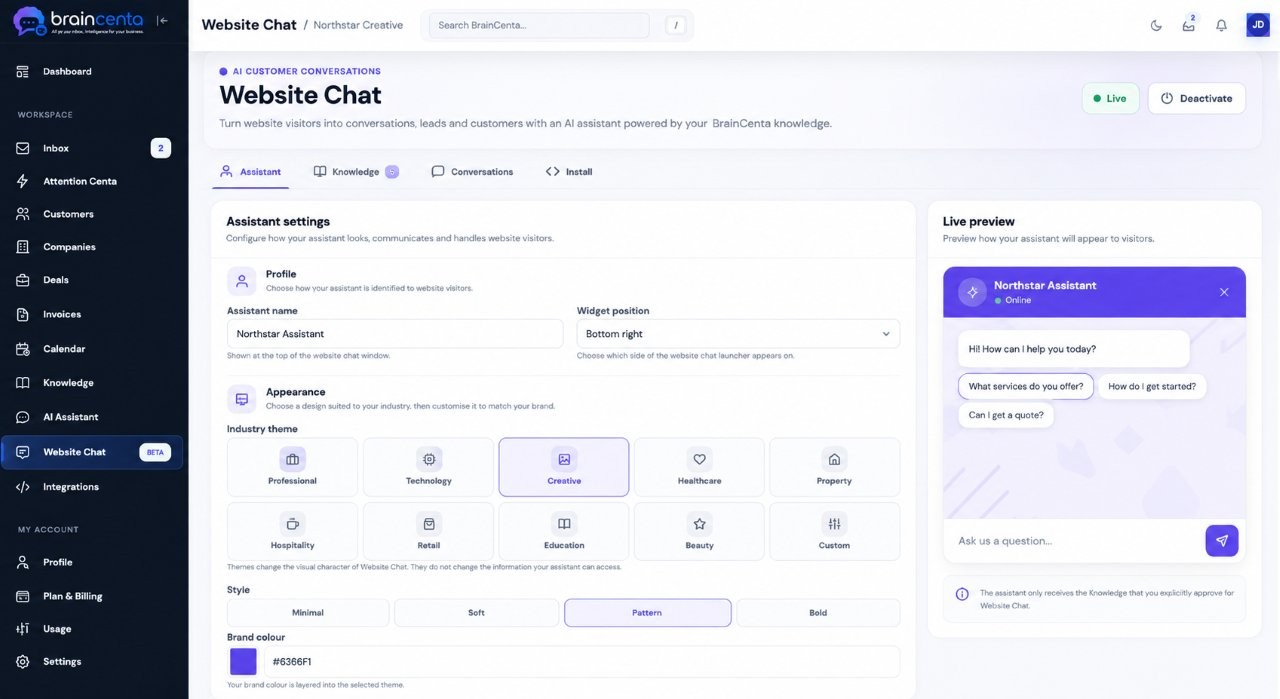
Website Chat is designed to sit naturally on your website. Choose an industry theme, visual style, brand colour, assistant name and position while previewing the experience before visitors see it.
BrainCenta Website Chat belongs inside the same workspace as your customer relationships, email, deals and business knowledge.
Instead of treating website chat as an isolated widget, BrainCenta gives your team a workspace where conversations can sit alongside the information used to manage the relationship.
See what the visitor wanted to discuss.
Keep relationship information close to the conversation.
Move the relationship into the rest of your CRM workflow.
Use BrainCenta to answer common questions from approved knowledge and help visitors find useful information faster.
Enable human handoff so a conversation can move beyond the assistant when a visitor needs your team.
"I'm interested in discussing a project and would like to speak with someone about the next steps."
Visitor asked about available services and received an answer from approved Knowledge.
Conversation answered using the pricing information approved for Website Chat.
Some questions need a person. Website Chat can support the first part of the conversation while still giving visitors a route towards your team.
Control how the assistant appears, where it can run and what information it can use.
Choose the website domains where your BrainCenta assistant is allowed to operate.
Choose which Knowledge articles the assistant can access for customer-facing answers.
Configure and preview your assistant before activating it for visitors on your website.
Give visitors a faster way to ask questions, discover your business and start a conversation—powered by the knowledge you choose to provide.